postgresql 在 win 和 linux 下的使用教程
安装
在linux下安装
sudo apt-get install postgresql postgresql-client # 安装
sudo service postgresql start # 启动
postgresql 配置文件
vim /etc/postgresql/(版本号)/main/postgresql.conf在windows下安装
下载地址 下一步进行安装就可以了。
使用
命令行基本使用
$ sudo su postgres  # 进入postgresql用户
$ psql --version  # 查看pgsql版本
$ psql -l  # 查看已有数据库
$ createdb theing # 创建一个名为theing 的数据库
$ psql theing # 进入这个数据库
> help # 查看帮助下同
> \h
> \?
> \l  # 查看已有数据库
> \q  # 退出数据库命令
> select now();  # 获取当前时间
> select version();  # 查看当前版本
> \q # 退出
$ dropdb theing  # 删除theing这个数据库
数据表的操作
# 主要使用命令
create table
drop table
psql
例子:
> create table posts (title varchar(255), content text); # 创建一个title 和content
> \dt  # 查看所有的表
> alter table posts rename to theing7; # 重命名表名为theing7
> drop table theing7; # 删除这个表
初步使用sql创建数据库表
$ vim db.sql
...
create table posts (title varchar(255), content text);
...
$ psql theing7
> \i db.sql  # 使用 \i 导入创建
> \dt
PostgreSql 字段类型
- 数值型:
- integer(int)
- real
- serial
- 文字型:
- char
- varchar
- text
- 布尔型:
- boolean
- 日期型:
- date
- time
- timestamp
- 特色类型:
- Array
- 网络地址型(inet)
- JSON型
- XML型
参考网站:
https://www.postgresql.org/docs/9.5/static/datatype.html
表约束
create table posts (
    id serial primary key,
    title varchar(255) not null,
    content text check(length(content) > 8),
    is_draft boolean default TRUE,
    is_del boolean default FALSE,
    created_date timestamp default 'now'
);
-- 说明
/*
约束条件:
not null:不能为空
unique:在所有数据中值必须唯一
check:字段设置条件
default:字段默认值
primary key(not null, unique):主键,不能为空,且不能重复
*/
insert 语句
插入一行值,或列
insert into [tablename] (field, ...) values (value, ...)例子
> insert into posts (title, content) values ('', '');
> insert into posts (title, content) values (NULL, '');
> insert into posts (title, content) values ('title1', 'content11');
> select * from posts;
> insert into posts (title, content) values ('title2', 'content22');
> insert into posts (title, content) values ('title3', 'content33');
> select * from posts;
select 语句
init.sql 文件进行初始化
create table users (
    id serial primary key,
    player varchar(255) not null,
    score real,
    team varchar(255)
);

insert into users (player, score, team) values
('库里', 28.3, '勇士'),
('哈登', 30.2, '火箭'),
('阿杜', 25.6, '勇士'),
('阿詹', 27.8, '骑士'),
('神龟', 31.3, '雷霆'),
('白边', 19.8, '热火');
查看表表中的信息
> \i init.sql
> \dt
> \d users
> select * from users;
> \x  # 行列转换
> select * from users;
> \x
> select * from users;
> select player, score from users;  # 查看具体某一列
where 语句
where基本是一个限制语句,使用where语句来设定select,update,delete语句数据抽出的条件。
例子:
> select * from users;
> select * from users where score > 20;
> select * from users where score < 30;
> select * from users where score > 20 and score < 30;
> select * from users where team = '勇士';
> select * from users where team != '勇士';
> select * from users where player like '阿%';
> select * from users where player like '阿_';
数据抽出选项
- order by 列名 asc; 正负排序
- limit 3; 限制3个
- offset 3 ;从第3个开始算
> select * from users order by score asc;
> select * from users order by score desc;
> select * from users order by team;
> select * from users order by team, score;
> select * from users order by team, score desc;
> select * from users order by team desc, score desc;
> select * from users order by score desc limit 3;
> select * from users order by score desc limit 3 offset 1;
> select * from users order by score desc limit 3 offset 2;
> select * from users order by score desc limit 3 offset 3;
统计抽出的数据
- distinct ;用于返回唯一不同的值(去重的值)。
- sum ;返回相加的值
- max/min ;返回最大/最小值;
- group 用于结合聚合函数,根据一个或多个列对结果集进行分组。
- having 子句可以让我们筛选分组后的各组数据。
> select distinct team from users;
> select sum(score) from users;
> select max(score) from users;
> select min(score) from users;
> select * from users where score = (select max(score) from users);
> select * from users where score = (select min(score) from users);
> select team, max(score) from users group by team;
> select team, max(score) from users group by team having max(score) >= 25;
> select team, max(score) from users group by team having max(score) >= 25 order by max(score);
方便函数
- length ;
- concat
- alias
- substring
- random
> select player, length(player) from users;
> select player, concat(player, '/', team) from users;
> select player, concat(player, '/', team) as "球员信息" from users;
> select substring(team, 1, 1) as "球队首文字" from users;
> select concat('我', substring(team, 1, 1)) as "球队首文字" from users;
> select random();
> select * from users order by random();
> select * from users order by random() limit 1;
可参考的网站:
https://www.postgresql.org/docs/9.5/static/functions.html
更新和删除
- update [table] set [field=newvalue,…] where …
- delete from [table] where …
例子:
> update users set score = 29.1 where player = '阿詹';
> update users set score = score + 1 where team = '勇士';
> update users set score = score + 100 where team IN ('勇士', '骑士');
> delete from users where score > 30;
变更表结构
- alter table [tablename] …
- create index …
- drop index …
例子:
> \d users;
> alter table users add fullname varchar(255);
> \d users;
> alter table users drop fullname;
> \d users;
> alter table users rename player to nba_player;
> \d users;
> alter table users alter nba_player type varchar(100);
> \d users;
> create index nba_player_index on users(nba_player);
> \d users;
> drop index nba_player_index;
> \d users;
操作多个表
- 之所以为对象数据库
- 表结合查询的基础知识
例子
renew.sql中
create table users (
    id serial primary key,
    player varchar(255) not null,
    score real,
    team varchar(255)
);
insert into users (player, score, team) values
('库里', 28.3, '勇士'),
('哈登', 30.2, '火箭'),
('阿杜', 25.6, '勇士'),
('阿詹', 27.8, '骑士'),
('神龟', 31.3, '雷霆'),
('白边', 19.8, '热火');

create table twitters (
    id serial primary key,
    user_id integer,
    content varchar(255) not null
);
insert into twitters (user_id, content) values
(1, '今天又是大胜,克莱打的真好!'),
(2, '今晚我得了60分,哈哈!'),
(3, '获胜咱不怕,缺谁谁尴尬.'),
(4, '明年我也可能转会西部'),
(5, '我都双20+了,怎么球队就是不胜呢?'),
(1, '明年听说有条大鱼要来,谁呀?');
sql导入,并执行
$ dropdb theing7;
$ createdb theing7;
$ psql theing7;
> \i renew.sql
> select * from users;
> select * from twitters;
# 可结合多个表之间的关系进行查询
> select users.player, twitters.content from users, twitters where users.id = twitters.user_id;
> select u.player, t.content from users as u, twitters as t where u.id = t.user_id;
> select u.player, t.content from users as u, twitters as t where u.id = t.user_id and u.id = 1;
pgadmin4 管理工具
下载地址 和安装步骤可参照官网。
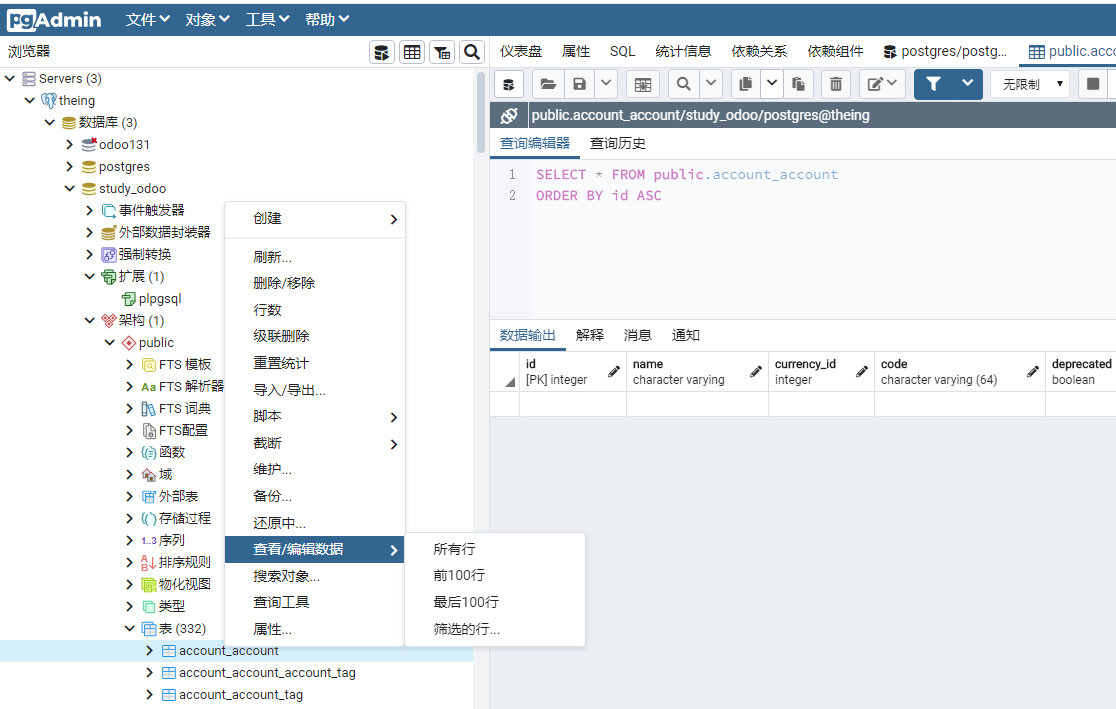
pgadmin是以浏览器来展示界面的,方便快捷。
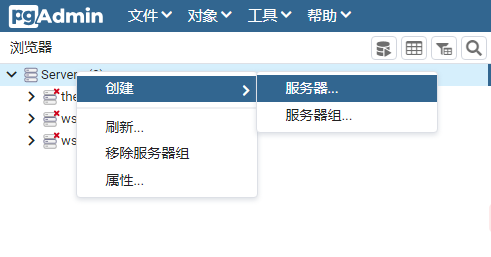
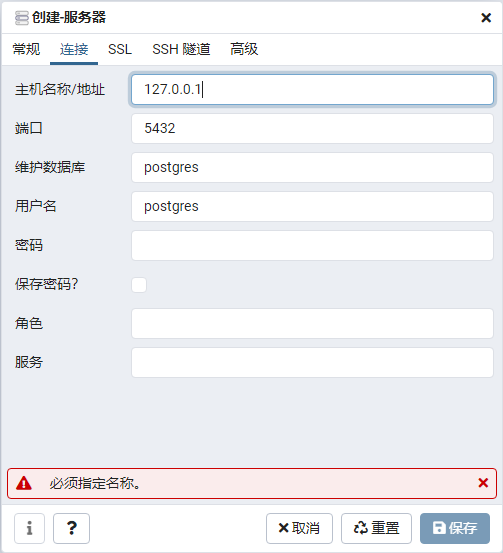
在server 栏右击创建服务器就可以连接数据库。